How to Activate Meesho Pay Later: Complete Step-by-Step Guide
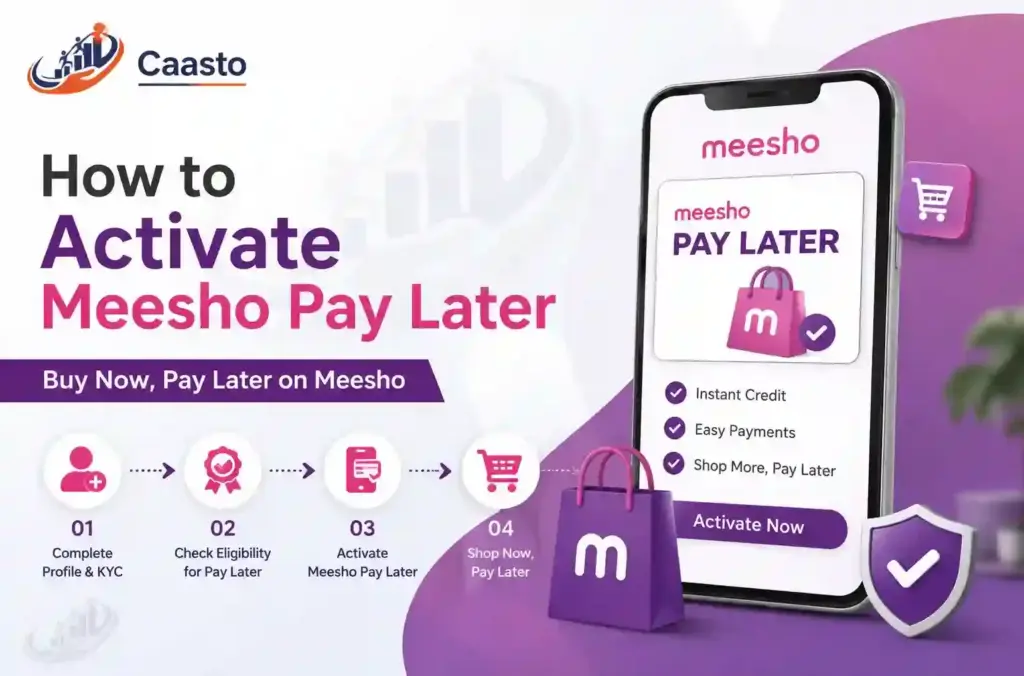
How to Activate Meesho Pay Later: Complete Step-by-Step Guide Buying is now significantly easier online than before, and Meesho has introduced a credit payment facility for its home buyers, making the process even simpler. The new function has also been well received by many of the regular customers, who require greater flexibility and convenience but do not want to pay in advance or have to collect cash on delivery. To find out more about how to activate Meesho Pay Later, you can read this article by Caasto. This gives you an overview of the step-by-step process for activation eligibility criteria and fees, and whether it’s worth using or not. Everything has been covered thoroughly so that first-time users have access to all of the information they need in order to make an educated decision, avoid any additional costs, and utilize this service responsibly while experiencing minimal stress associated with using the Meesho app. What Is Meesho Pay Later? Meesho Pay Later offers customers a short-term credit facility. Customers can purchase products and make payments at a later time without having to make any upfront payments. It works like a modernized ‘buy now, pay later’ (BNPL) service, which many ecommerce sites are currently offering today. Meesho does not charge you money at checkout, but Meesho provides you with the product before you pay for it and allows you to repay it within a set amount of time. This facility is very advantageous for customers who require flexibility or do not wish to pay for every purchase with a debit/credit card. Meesho Pay Later Eligibility You must verify whether or not you’re eligible for enable meesho pay later before learning how to do so. Generally speaking, eligibility for Meesho Pay Later is contingent upon several factors, including: Active Meesho account with basic order history and verified. A valid PAN card and mobile number linked to the Aadhaar card for the KYC process. A good record of repayments if you have used similar credit. All dues for prior Meesho orders have been settled. Meesho will use the services of a partnered NBFC or fintech company to determine your creditworthiness. Not all users will be able to view this option immediately upon release, as it is based on account activity and risk assessment. How to Activate Meesho Pay Later – Step by Step So let’s go on to the practical process. Below is how to turn on Meesho Pay Later for your account: Open the Meesho app – Make sure you’re using the latest version of the app for the feature to appear. Go to the Your Profile Section – Tap on the your profile icon and select “Meesho Pay Later” or “Payment Options”. Verify eligibility – The app will ask you to verify your eligibility based on your account activity. Complete KYC verification – submit your PAN, Aadhaar, and other basic information for identification verification. Setting a credit limit– Once approved, Meesho will assign a credit limit that you can use for future purchases. Start shopping – choose Meesho Pay Later as payment at the checkout, and your order will be processed immediately. If used, this option will be available for future orders unless there are any repayment problems. Pay After Delivery in Meesho App One of the most appealing aspects of this function is that it allows you to pay after delivery within meesho app. Compared to the traditional cash-on-delivery method, pay later allows customers to first receive their order and then, at a later stage (usually within days), make payment via electronic means. This form of purchasing is unique from the others because buyers can view their purchases before making a purchase and therefore reduce the risk associated with purchasing defective products. Meesho Pay Later Cash on Delivery One of the more frequent questions I get from customers is, “Are Meesho Pay Later and Cash on Delivery basically the same thing?” They are not the same. You have to make a payment of cash on delivery, at the time of arrival of the parcel; while pay later lets you delay your payment online by selecting one of UPI, net banking, or card and making payment when it becomes due. If you like a cashless and flexible repayment schedule, then paying later would likely be easier for you. Meesho Pay Later Charges Before you activate the Meesho Pay Later feature, it is important to learn about these charges. In most cases, there are no fees associated with repayment within the specified free credit period. Meesho may apply fees if you delay your payment past the due date: Late payment fees Interest charges on the outstanding amount Temporary suspension of the Pay Later facility for future orders It’s a good idea to take a look at the exact charges displayed during checkout, as they can be different according to your credit partner and repayment history. Is the Meesho Pay Later Option Good or Bad? Is Meesho Pay Later a good or bad option? It all depends on how responsibly you utilize it. For customers who make their payments on time, it provides tremendous flexibility and eliminates the need for any payment to be made upfront. Another highly desirable function is being able to visually inspect products before making a purchase. However, if repayment is delayed beyond the due date, then you will be liable to pay an additional amount as a charge. Furthermore, your creditworthiness with Meesho & its partner NBFC may be adversely impacted by such delayed payments. If utilized properly, this feature can function as a smart shopping tool. If used improperly, credit can become a financial burden. Key Takeaways So now that you understand how to activate Meesho Pay Later, it’s up to you whether or not this option works for your shopping patterns. Check your eligibility, know what you are being charged for, and always pay back on time to get the most benefit out of this very convenient service. Caasto believes informed
How to Activate Meesho Pay Later: Complete Step-by-Step Guide Read More »