
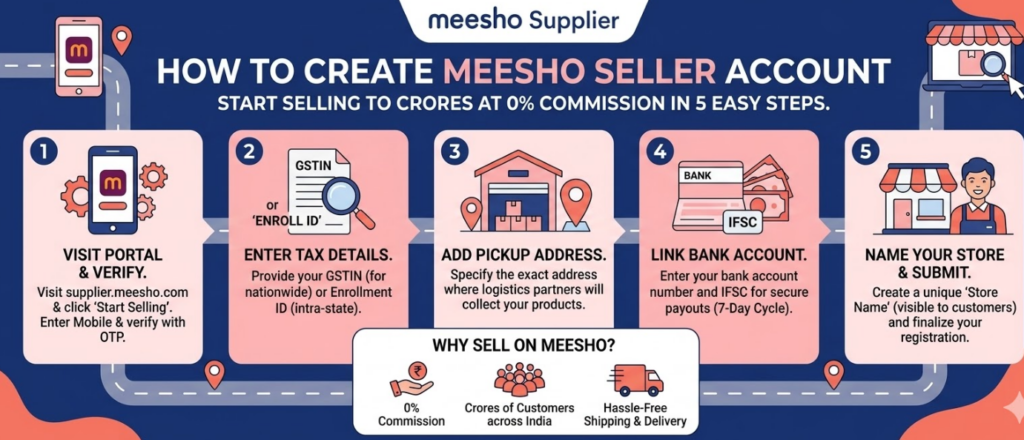
How to Create a Meesho Seller Account
You can sell things quickly, affordably and easily using Meesho. It’s a straightforward task without having to do anything difficult. This guide will explain, in detail, how to set up a Meesho Seller account and how to benefit from having good account management with your seller account.
To create a Meesho Seller Account you will need to follow these steps.
The Procedures for Creating an Account Will Be Simple. Please Follow the Steps Below One Step at A Time.
What To Have Available Before You Start
You Will Need to Have the Following Available to Set Up Your Seller Account with Meesho:
- Your mobile
- your email
- GSTIN
- Pan
- Bank Account,
- Your Pickup Address.
Not Having or Incorrect Information Will Delay Your Approval Process.
Step 1: Go To Meesho Supplier Panel
- Go to https://supplier.meesho.com
- Click on the New Seller, Start Selling Button.
This will begin the Meesho Seller Registration Process.
Step 2: Create A Seller Account
- Enter Your Mobile,
- receive the OTP to verify.
- Create Email and Password.
- Now You Have Your Login Set Up.
Step 3: Enter GST Details
- Your GSTIN must be entered
- Verify your Details
- Verify Your Name and Commercial Address
If Your Name or Your Address Do Not Match Your GSTIN#, You Must Correct Those Errors. This Is One of The Most Important Steps in Managing Your Seller Account Effectively.
Step 4: Fill Out Business Information
- Business Name
- Store Name
- Pickup Address
Make sure accurate information is provided here as it affects your shipping and operation.
Step 5: Provide Banking Information
- Account Holder Name
- Account Number
- IFSC Code
Payments will be deposited here so errors may cause delayed payouts.
Step 6: Complete KYC Requirements
Please upload required documents:
- PAN Card
- Aadhaar
- Bank Proof
Approval typically takes 1-2 days.
Step 7: Access Seller Dashboard
Once approved, you will gain access to the seller dashboard for Meesho.
This is where you will conduct your business.
Step 8: List Your First Product
The way you list your first product will determine how many sales you will make.
For each product you list make sure to include:
- High quality images
- Clear product title that includes keywords
- Correct product Category
- Price and any variations of the price
Example:
Poor Listing: “Shirt”
Good Listing: “Men’s Cotton Casual Blue Regular Fit Shirt”
If strong listings are created initially to reduce the work that will need to be done later to support your Meesho seller account.
Step 9: Set Smart Pricing
When pricing your products, include:
- Cost of your product
- Meesho’s commission
- Your profit margin
Start with a slim profit margin:
- Gain initial orders
- Build your rating
- Increase your prices later
Step 10: Receive & Ship Order
Receiving and shipping orders is a simple process:
- You receive an order
- Package the product
- Print the shipping label
- Shipping provider picks up the order
Meesho takes care of delivery.
Step 11: Focus on First Order
Your first order(s) are important to establishing your track record as a seller.
To do this:
- Ship your order on time
- Do not cancel orders
- Maintain your inventory stock
- Make sure product quality is high
This will help establish your trust level with customers and improve your ranking.
Step 12: Track Your Payments & Reports
Payments are made to sellers every 10 business days
Keep track of your payments
Key Mistakes to Avoid
- Incorrect GST Information
- Low Quality Product Images
- Overpricing From the Start
- Delayed Shipment
- Failing To Accept Returns
Resolve These Before They Create Issues with Your Account.
Meesho Seller Account Management Concepts
If You Want to Grow, Check These Out:
- Daily Product Uploads
- Maximize Product Title Keywords
- Use Quality Product Photos
- Have Competitive Pricing
- Ship Products Quickly
You Achieve Results By Maintaining Consistency.
Meesho Seller Growth Strategy
Start Out Simple:
- Have 10-20 Products Listed
- Try Many Different Categories
- Monitor Sales of Each Product
- Develop an Expansion Plan for Products That Are Selling
Continue Doing What Works, Stop Doing What Does Not Work.
Be Realistic
- Setup Takes 1-2 Days
- Initial Orders May Take 1-3 Weeks
- Growth Is Dependent Upon Consistency
There Are No Shortcuts; There Is Only Execution.
Final Thoughts
You Can Start Selling Meesho Without a Large Investment, But You Need Good Procedures and Take Daily Action. Take These Steps to Enhance Your Listings and Be Consistent. A Strong Meesho Seller Account Management Program Can Lead to Steady Income and Long-Term Success as A Seller On Meesho. Remember, Start Rapidly and Expand What Works.